Almost every piece of faceless YouTube advice starts from the same picture: a viewer, alone, phone in hand, thumb hovering over the next video. Big text, fast cuts, something new on screen every two seconds, because the phone is small and the thumb is impatient.
Then you open the device report on a real channel and the picture is wrong.
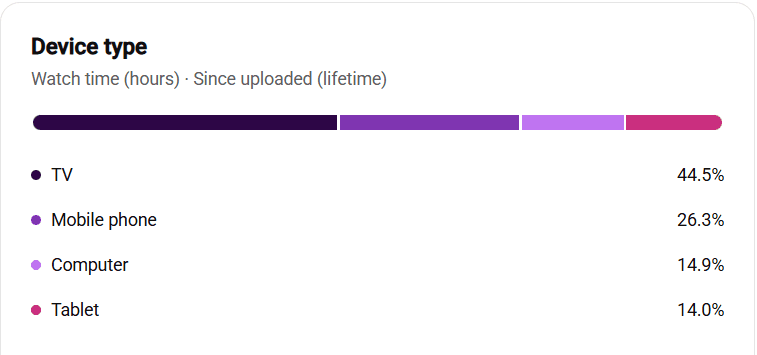
On this channel 44.5% of all watch time, since the day it started, has come from a television. Phones are second at 26.3%. Computers and tablets split the rest almost evenly. Nearly half of every hour anyone has spent with these videos was spent across a room, on the biggest screen in the house, with a remote control instead of a thumb.
This is not unusual for the kind of long-form, narrated content most faceless channels make. It is unusual for anyone to check. The report sits in YouTube Studio under Audience, it has been there for years, and the people writing scripts for these channels have mostly never opened it.
What a TV viewer is actually doing
A phone viewer is leaning in. They chose your video on purpose, they are holding it, and they can be gone in a single movement. A TV viewer is leaning back. Very often they did not choose your video at all: it autoplayed after the last one, or it was the next thing in a row of suggestions, and they let it run. Leaving takes a remote, a menu and a decision. Staying takes nothing.
That changes the maths of the first fifteen seconds. On a phone the opening has to win a click it already has. On a TV the opening has to earn a decision not to reach for the remote. The first job is the same, get to the point, but the second job is different: sound like something worth not interrupting. A calm, confident voice doing that beats a frantic one.
Three things to change in the script
Text size first. Anything you put on screen is being read from three metres away by someone who may not have their glasses on. If a caption, a number or a label matters, it needs to be large enough to read from the couch. If it is not large enough, cut it, because on a TV small text is not information, it is clutter.
Pacing second. The two-second cut rate that phone advice recommends is exhausting on a large screen and it makes narrated content feel cheap. TV viewers sit through longer shots without complaint, and the narration is doing the work anyway. Let a good picture stay up while the sentence finishes.
Density third. The phone assumption says put more on screen because attention is short. The TV assumption says put less on screen because the screen is already big and the viewer is already comfortable. One clear image per idea. If you cannot say what a shot is for, it is filler, and filler reads as filler on a 55-inch panel.
What it changes about your thumbnails
The same viewer who watches on a TV is choosing the next video from a row of thumbnails on that TV, sitting back, often with the sound of the last video still playing. Thumbnails with four elements, a small face and a line of text at the bottom turn into noise at that distance. One subject, one contrast, three words at most. Then check it at phone size too, because the phone is still a quarter of the audience, and a thumbnail that works at both sizes is usually the simpler one.
Go and look at yours
Your split will not be 44.5%. It might be higher. Documentary, history, nature, finance explainers and anything people put on in the evening lean hard to the TV. Shorts-led and news-led channels lean to the phone. The point is not the number, it is that you have never checked, and the script you are writing tonight is built on a guess about a screen.
Open YouTube Studio, go to Audience, and find the device type card. Set it to watch time, not views, because views count taps and watch time counts attention. Then write the next script for the screen that is actually doing the watching.